
An entry that brings together the edition and your read
Each entry includes cover, title, author, series, volume, status, format, genre, page count and start and finish dates. You can set the cover by URL or swap it in the entry. These details identify the book and give context to your history.
The Series and Volume fields also power the automatic creation of sagas. Tracking and organizing sagas is part of Premium.
Personal summary, tags and favorite characters
The personal summary keeps your impressions of the book. Tags let you label things like tropes, themes and story traits. The favorite characters area holds the name and a comment about each character you want to remember.
Personal rankings add Spice, Fluff, Tear and Humor ratings. They are Premium only. You don’t have to fill in the personal fields to add a book.
Quotes and visual memories alongside the book
Favorite quotes preserve the passages that stood out in your read. The moodboard brings together images, text, quotes, color blocks and other visual elements in a composition linked to the same entry.
Moodboards are Premium; unlimited quotes and notes are also part of that plan. The tutorials explain how to use each feature separately.
A history that includes rereads
The entry lets you log rereads and note whether you’d read that book again. That way, your relationship with a story isn’t limited to a single pass through your library.
Wanting to reread and logging a reread are different pieces of information: one expresses your preference; the other records a new reading cycle.
About the book: technical details and synopsis
The About the book tab keeps bibliographic information separate from your personal entries. It holds subtitle, ISBN, publisher, language, publication date and edition. The Fetch details action can fill in data when it’s available.
The synopsis is the catalog description or your own text; the personal summary records your experience. Keeping the two fields apart avoids mixing how the book is presented with your opinion of it.
Rating, favorite and emoji reaction
On the book’s page, the star rating, the favorite marker and the emoji reaction express different aspects of the read. You can enjoy a story, rate it and keep the emotion it stirred without having to write a review.
These markers complement the bibliographic data and make the entry more personal. The emoji reaction doesn’t replace Premium’s emotional rankings.
Add your books or plan your reading with the TBR
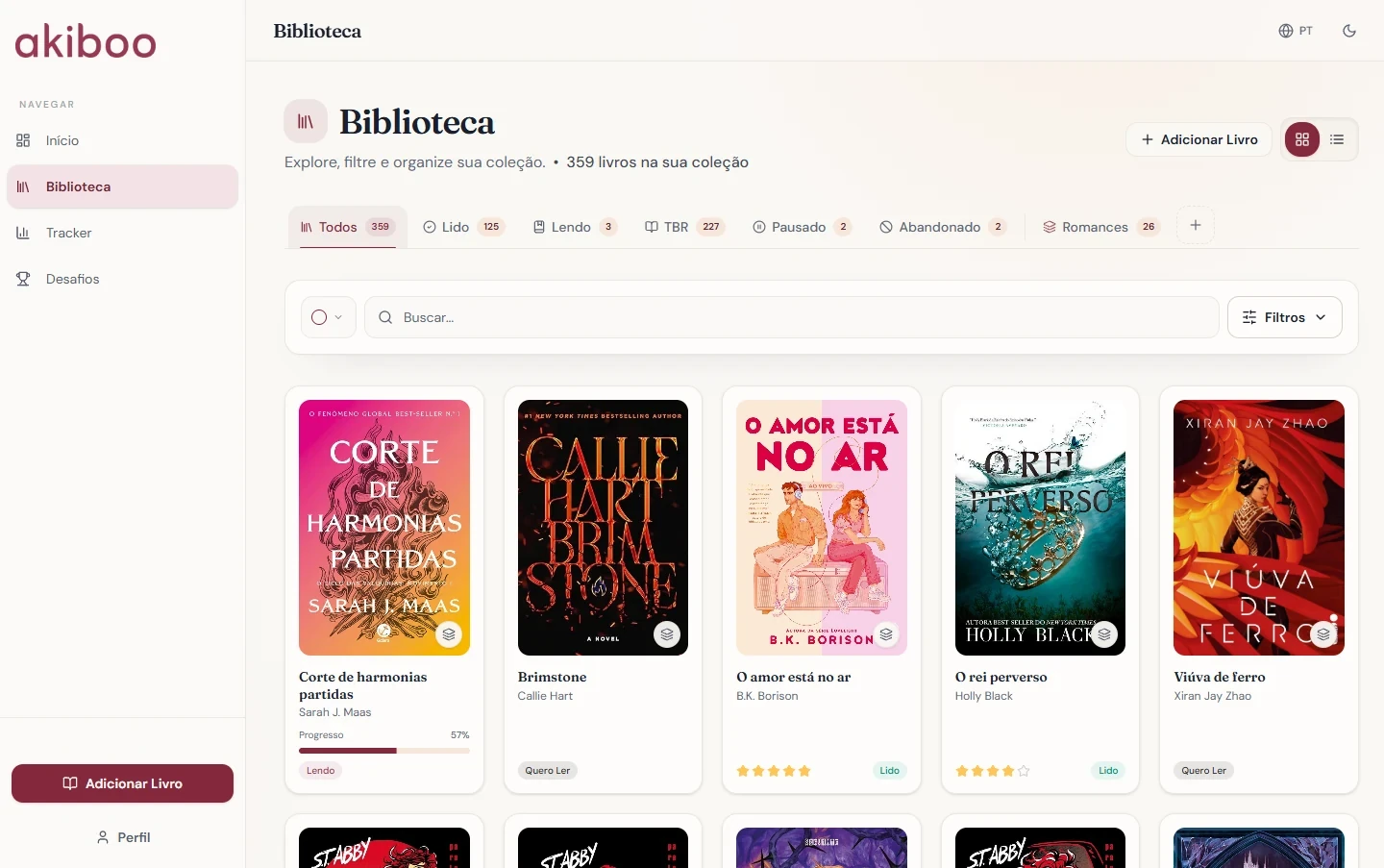
The Library brings together the entries in your collection and the books you want to read. You can add a book to your collection or to your TBR to plan future reads. This lets you separate what’s already in your history from what you still want to discover.
TBR stands for to be read. It’s not just a shopping list: it also includes titles you already own but haven’t read, plus your picks for what to read next.
Six fixed shelves and room to create your own
The six fixed shelves are All, Read, Reading, TBR, Paused and Abandoned. All shows the full collection; the others organize your entries by where each read stands. Counters help you see how many books are in each group.
Besides these shelves, you can create others to organize your collection by your own criteria, such as authors, genres, book club or personal projects. Custom shelves complement the Library’s fixed organization.
A TBR for the books you own and the ones you still want
Inside the TBR, the All view gathers the titles to read. My Books separates the ones you already own; Wishlist, the ones you want to buy; and Up Next, your picks to read soon.
These sections help you tell wanting to buy apart from reading priority. A book you’ve bought can stay in the TBR until you start reading it, while Up Next works as a shortlist of what you plan to prioritize.
Search by name, multi-select and advanced filters
Searching by name finds titles without scrolling through every cover. The selector lets you mark several books to manage a selection, instead of working with only one entry at a time.
Advanced filters narrow down your collection by criteria such as genre, format, tags, rating and year. In the TBR, priority can also be part of the filtering. Sorting options help you change how results are shown depending on the context.
For example, you can look at a specific format or combine criteria to shorten the list of titles shown. Search, the selected shelf and filters are complementary layers of the same lookup.
A digital library to organize your personal collection
A digital personal library is a catalog of your books and entries. It can represent a print collection, digital reads, audiobooks or a mix of these formats. On Akiboo, adding a book and tracking your reading happen in the same experience.
Cataloging a title doesn’t mean getting the book’s content. Akiboo organizes reading information and activity; it isn’t an ebook store or an audiobook player. This distinction helps you choose the right app for your needs.
Statuses, shelves and tags are not the same thing
Status tells you where a read stands. A shelf groups books by a criterion that makes sense to you, like book club, genres, authors or favorites. Tags add characteristics that can cut across several shelves, such as literary tropes, light reads, vacation reads or a friend’s recommendation.
For example, a novel can have the status Reading, sit on a shelf of this semester’s reads and carry theme tags. These criteria don’t compete: each one describes a different aspect of the same entry.
Print books, ebooks and audiobooks in the same organization
Format tells you how you’re reading: print, ebook or audiobook. It doesn’t replace genre or status. One title can be a print fantasy book you haven’t started, while another can be a finished nonfiction audiobook.
Keeping these details separate avoids mixing up the kind of file or copy with how the read is going. Page count and other bibliographic details should match the edition you added, especially when there are different versions of the same title.
Search, filters and import for collections of any size
In a small collection, covers alone help you recognize your reads. As the library grows, search and filters become more important for finding a title without browsing the whole shelf. Organizing by data makes the collection searchable, not just visual.
If you already have records in a compatible CSV file, importing lets you reuse part of that work. The content available depends on the file’s columns. The preview and confirmation help you check the books before adding them to your library.
What each piece of information is for
| Feature or information | Purpose |
|---|---|
| TBR | Books to read, split into My Books, Wishlist and Up Next |
| Fixed shelves | All, Read, Reading, TBR, Paused and Abandoned |
| Multi-select | Marking several books to manage a selection |
| Advanced filters | Narrowing the collection with combined criteria |
| Status | Where the read stands: reading, read or another state |
| Format | Print, ebook or audiobook |
| Shelf | A group of books based on a personal criterion |
| Tag | Extra characteristics, themes or tropes |
| Series and volume | The book’s position within a saga |
Features that work together
See the reading journal · Discover sagas and lists
To learn the app’s actions, visit the guides hub. To choose a subscription, check out Akiboo’s plans.